
HTTP Outdated Versions
SeverityLow
trBu makaleyi Türkçe okuyunALTERNATIVE NAMES
HTTP Header Information Disclosure
AFFECTED SYSTEMS
All systems that expose header information are potentially vulnerable to HTTP Outdated versions.
SEVERITY
Low
BACKGROUND
HTTP is a protocol that uses TCP/IP Stack. Similar to telnet, the HTTP client also sends clear text commands to the HTTP server like GET, PUT, TRACE etc.
DESCRIPTION
When a client sends a command to the HTTP Server, the server sends a header before sending the requested content. The header contains information on encoding, compression, and other information about the server. This allows the client to decipher the message once it is received but the header might contain information that attackers might make use of. Below is a sample header from a negotiation between the client and the server:
GET / HTTP1.1
Host: www.rackdc.com
Date: Sun, 21 Jul 2019 20:08:57 GMT
Server: Apache/2.4.6 (CentOS) OpenSSL/1.0.2k-fips PHP/7.2.11
Content-Length: 226
Connection: close
Content-Type: text/html; charset=iso-8859-1
As you can see, the server exposes that it is using Apache, OpenSSL, and PHP along with their versions. This is dangerous, since this information allows the attacker to know which vulnerabilities might be used against the server. Also, this beats the purpose of the HTTP protocol, since once the data leaves the server, server-side scripts and protocols are not used anymore: HTTP and client side protocols handle the rest. To fix this vulnerability follow our solutions below.
SOLUTION
on Apache
Modify the apache configuration file. It may be located in different paths depending on your Linux distribution. On some common distros you can find the main configuration file as shown below:
on Debian
vi /etc/apache2/apache2.conf
on CentOS
vi /etc/httpd/conf/httpd.conf
Add these commands to the end of the config file:
ServerSignature Off
ServerTokens Prod
Restart the server by typing apachectl restart
on Nginx
Modify nginx.conf with vi /etc/nginx/nginx.conf
Add the line server_tokens off; anywhere inside the http tag:
http {
    log_format  main  '$remote_addr - $remote_user [$time_local] "$request" '
                      '$status $body_bytes_sent "$http_referer" '
                      '"$http_user_agent" "$http_x_forwarded_for"';

    access_log  /var/log/nginx/access.log main;

    sendfile            on;
    tcp_nopush          on;
    tcp_nodelay         on;
    keepalive_timeout   65;
    types_hash_max_size 2048;

    include             /etc/nginx/mime.types;
    default_type        application/octet-stream;

    server_tokens off;
    ...
    ...
}
on IIS
Remove Server Headers:
There are two ways to do this in IIS.
- Edit the system.web file located at C:\inetpub\wwwroot and add the following lines:
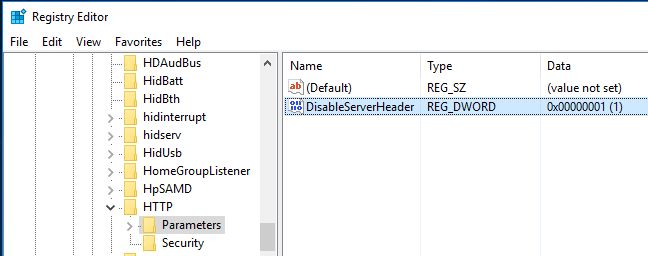
- Open the registry editor by pressing the windows symbol on the bottom left and searching regedit. Navigate to this branch HKLM\SYSTEM\CurrentControlSet\Services\HTTP\Parameters, right click and add a DWORD32 named DisableServerHeader with value 1.
These options will disable server headers in your IIS.
Remove X-Powered-By:
If your server is powered by ASP.NET you should also remove the X-Powered-By using HTTP Response Headers in the IIS:
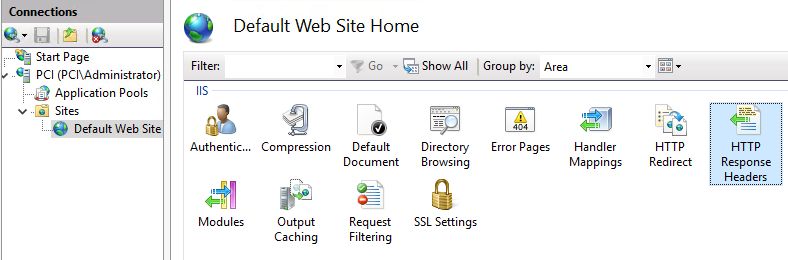
Open HTTP Response Headers by double clicking and click X-Powered-By header and click remove.
LEGAL:
Copyright (c) 2019 – 2026 ONLAYER Bilişim Teknolojileri A.Ş.
Permission is granted for the redistribution of this alert by explicitly linking the page to be referred. It may not be edited in any way without written consent.
Disclaimer: The information in the advisory is believed to be accurate at the time of publishing based on currently available information. Use of the information constitutes acceptance for use in an AS IS condition. There are no warranties concerning this information. Neither the author nor the publisher accepts any liability for any direct, indirect, or consequential loss or damage arising from the use of, or reliance on, this information.