
How to disable weak ciphers for Apache on RedHat Servers
SeverityHigh
trBu makaleyi Türkçe okuyunAFFECTED SYSTEMS
Apache Web Server – RedHat Enterprise Linux
SEVERITY
High
BACKGROUND
Default installations of SSL over HTTP are essential but come with pre-settings which are not compatible with PCI-DSS on most systems. Most of the vendors choose compatibility to security, those systems will be enabled to communicate with the best compatibility settings which include many ciphers and protocols for backward compatibility. When a browser starts to communicate with the SSL enabled server, the server sends a list of ciphers that can be used to secure communications with the browser. Some of the ciphers offered by the server with the default installations may be weak or non-compliant to PCI-DSS. This is an essential guide to disable these ciphers on various systems.
DESCRIPTION
An attacker may search for a weak protocol or cipher and may get valuable information through deciphering weak ciphers. The attacker must be able to sniff the network or can have man-in-the-middle on the pipeline to decrypt the valuable information. On the other hand, some exploits may expose server and user credentials by having buffer overflows.
PoC
Default Apachessl configuration includes weak ciphers and protocols enabled by default.
SOLUTION
Installing Signed SSL Certificate
Apache requires mod_ssl to enable SSL communications. If you are not using a virtual host directive, editing ssl.conf is necessary. For PCI-DSS environment we also recommend the use of the default web site under /var/www directory. If you have to use a VirtualHost directive you may copy the same instructions inside the VirtualHost section of the appropriate config file. This guide is based on RedHat flavors and will have similar implementations on other distros.
- Install mod_ssl
- Configure ssl.conf
- Harden system & services
If you didn’t already install the Apache Web Server and mod_ssl, use the following lines to do so:
[root@doc-apache ~]# yum install mod_ssl
Loaded plugins: fastestmirror
Loading mirror speeds from cached hostfile
 * base: ftp.wrz.de
 * extras: ftp.plusline.net
 * updates: ftp.halifax.rwth-aachen.de
Resolving Dependencies
--> Running transaction check
---> Package mod_ssl.x86_64 1:2.4.6-89.el7.centos will be installed
--> Processing Dependency: httpd-mmn = 20120211x8664 for package: 1:mod_ssl-2.4.6-89.el7.centos.x86_64
--> Processing Dependency: httpd = 2.4.6-89.el7.centos for package: 1:mod_ssl-2.4.6-89.el7.centos.x86_64
--> Processing Dependency: httpd for package: 1:mod_ssl-2.4.6-89.el7.centos.x86_64
--> Running transaction check
---> Package httpd.x86_64 0:2.4.6-89.el7.centos will be installed
--> Finished Dependency Resolution

Dependencies Resolved

==========================================================================================================================================================================================================================================================================
 Package                                                      Arch                                                        Version                                                                      Repository                                                    Size
==========================================================================================================================================================================================================================================================================
Installing:
 mod_ssl                                                      x86_64                                                      1:2.4.6-89.el7.centos                                                        updates                                                      112 k
Installing for dependencies:
 httpd                                                        x86_64                                                      2.4.6-89.el7.centos                                                          updates                                                      2.7 M

Transaction Summary
==========================================================================================================================================================================================================================================================================
Install  1 Package (+1 Dependent package)

Total download size: 2.8 M
Installed size: 9.6 M
Is this ok [y/d/N]: y
Downloading packages:
(1/2): mod_ssl-2.4.6-89.el7.centos.x86_64.rpm                                                                                                                                                                                                      | 112 kB  00:00:00
(2/2): httpd-2.4.6-89.el7.centos.x86_64.rpm                                                                                                                                                                                                        | 2.7 MB  00:00:01
--------------------------------------------------------------------------------------------------------------------------------------------------------------------------------------------------------------------------------------------------------------------------
Total                                                                                                                                                                                                                                     2.5 MB/s | 2.8 MB  00:00:01
Running transaction check
Running transaction test
Transaction test succeeded
Running transaction
  Installing : httpd-2.4.6-89.el7.centos.x86_64                                                                                                                                                                                                                       1/2
  Installing : 1:mod_ssl-2.4.6-89.el7.centos.x86_64                                                                                                                                                                                                                   2/2
  Verifying  : 1:mod_ssl-2.4.6-89.el7.centos.x86_64                                                                                                                                                                                                                   1/2
  Verifying  : httpd-2.4.6-89.el7.centos.x86_64                                                                                                                                                                                                                       2/2

Installed:
  mod_ssl.x86_64 1:2.4.6-89.el7.centos

Dependency Installed:
  httpd.x86_64 0:2.4.6-89.el7.centos

Complete!
Now you have the Apache Web Server and mod_ssl installed, enable httpd service on boot by typing:
[root@doc-apache SSL]# systemctl enable httpd
Created symlink from /etc/systemd/system/multi-user.target.wants/httpd.service
to /usr/lib/systemd/system/httpd.service.
Importing Signed Certificate
Put your certificate and intermediate files to the folder “/etc/httpd/SSL/crt” and set the config file “/etc/httpd/conf.d/ssl.conf” as follows. Note the line that starts with SSLCipherSuite. This is where we set which ciphers will be used to secure communications. You can use this line to add in more ciphers to secure your communications as necessary.
Listen 443 https

SSLPassPhraseDialog exec:/usr/libexec/httpd-ssl-pass-dialog

SSLSessionCache         shmcb:/run/httpd/sslcache(512000)
SSLSessionCacheTimeout  300

SSLRandomSeed startup file:/dev/urandom  256
SSLRandomSeed connect builtin
SSLCryptoDevice builtin

<VirtualHost _default_:443>

ErrorLog logs/ssl_error_log
TransferLog logs/ssl_access_log
LogLevel warn

SSLEngine on

Header always set Strict-Transport-Security "max-age=15768000"
SSLProtocol all -SSLv3 -TLSv1 -TLSv1.1
SSLCipherSuite          ECDHE-ECDSA-AES256-GCM-SHA384:ECDHE-RSA-AES256-GCM-SHA384:ECDHE-ECDSA-CHACHA20-POLY1305:ECDHE-RSA-CHACHA20-POLY1305:ECDHE-ECDSA-AES128-GCM-SHA256:ECDHE-RSA-AES128-GCM-SHA256:ECDHE-ECDSA-AES256-SHA384:ECDHE-RSA-AES256-SHA384:ECDHE-ECDSA-AES128-SHA256:ECDHE-RSA-AES128-SHA256
SSLHonorCipherOrder     on
SSLCompression          off

SSLCertificateFile /etc/httpd/SSL/cer/STAR_rackdc_com.crt

SSLCertificateKeyFile /etc/httpd/SSL/csr/star.rackdc.com.key

SSLCertificateChainFile /etc/httpd/SSL/cer/My_CA_Bundle.ca-bundle

SSLCACertificateFile /etc/httpd/SSL/cer/AddTrustExternalCARoot.crt

<Files ~ "\.(cgi|shtml|phtml|php3?)$">
    SSLOptions +StdEnvVars
</Files>
<Directory "/var/www/cgi-bin">
    SSLOptions +StdEnvVars
</Directory>

BrowserMatch "MSIE [2-5]" \
         nokeepalive ssl-unclean-shutdown \
         downgrade-1.0 force-response-1.0

CustomLog logs/ssl_request_log \
          "%t %h %{SSL_PROTOCOL}x %{SSL_CIPHER}x \"%r\" %b"

</VirtualHost>
Restart your server by typing:
apachectl restart
You should see the lock sign on the left hand side of the domain name as shown above. This means your SSL certificate is working properly.
Onlayer Hardening
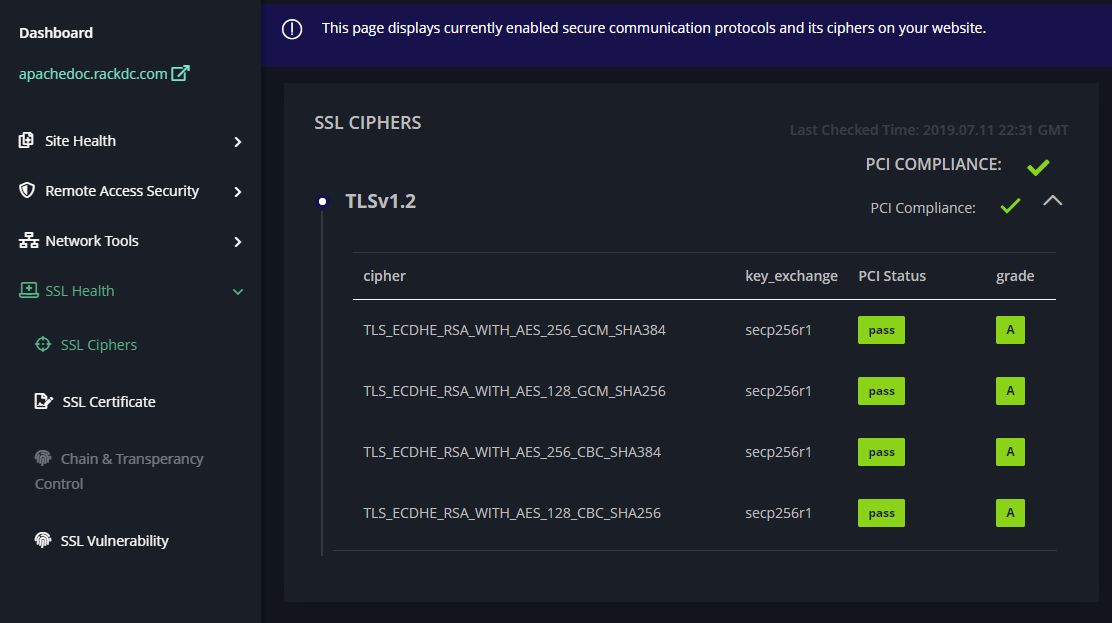
Having an SSL certificate doesn’t automatically make your connection secure. To make your server more secure we recommend adding your service to the Onlayer Dashboard. This way, you can track the changes you make and see what needs to be changed in order to make your service more secure. Once you’ve done so you’ll be presented with a similar page as below.
LEGAL: Copyright (c) 2019 – 2026 ONLAYER Bilişim Teknolojileri A.Ş.
Permission is granted for the redistribution of this alert by explicitly linking the page to be referred. It may not be edited in any way without written consent.
Disclaimer: The information in the advisory is believed to be accurate at the time of publishing based on currently available information. Use of the information constitutes acceptance for use in an AS IS condition. There are no warranties concerning this information. Neither the author nor the publisher accepts any liability for any direct, indirect, or consequential loss or damage arising from the use of, or reliance on, this information.