
How to disable weak ciphers for Nginx on RedHat Servers
SeverityHigh
trBu makaleyi Türkçe okuyunAFFECTED SYSTEMS
Nginx Web Server – RedHat Enterprise Linux
SEVERITY
High
BACKGROUND
Default installations of SSL over HTTP are essential but come with pre-settings which are not compatible with PCI-DSS on most systems. Most of the vendors choose compatibility to security, those systems will be enabled to communicate with the best compatibility settings which include many ciphers and protocols for backward compatibility. When a browser starts to communicate with the SSL enabled server, the server sends a list of ciphers that can be used to secure communications with the browser. Some of the ciphers offered by the server with the default installations may be weak or non-compliant to PCI-DSS. This is an essential guide to disable these ciphers on various systems.
DESCRIPTION
An attacker may search for a weak protocol or cipher and may get valuable information through deciphering weak ciphers. The attacker must be able to sniff the network or can have man-in-the-middle on the pipeline to decrypt the valuable information. On the other hand, some exploits may expose server and user credentials by having buffer overflows.
PoC
Default nginx ssl configuration includes weak ciphers and protocols enabled by default.
SOLUTION
Installing Signed SSL Certificate
If you are not using a virtual host directive, editing nginx.conf is enough. For PCI-DSS environment we also recommend the use of the default web site. If you have to use a VirtualHost directive you may copy the same instructions to the VirtualHost section of the appropriate config file. This guide is based on RedHat flavors and will have similar implementations on other distros.
Importing Signed Certificate
Put your certificate and intermediate files to the folder “/etc/nginx/SSL/” and edit the config file “/etc/nginx/nginx.conf” by adding TLS related commands:
ssl_session_timeout 1d;
ssl_session_cache shared:MozSSL:10m;  # about 40000 sessions
ssl_session_tickets off;

ssl_protocols TLSv1.2;
ssl_ciphers ECDHE-ECDSA-AES128-GCM-SHA256:ECDHE-RSA-AES128-GCM-SHA256:ECDHE-ECDSA-AES256-GCM-SHA384:ECDHE-RSA-AES256-GCM-SHA384:ECDHE-ECDSA-CHACHA20-POLY1305:ECDHE-RSA-CHACHA20-POLY1305:DHE-RSA-AES128-GCM-SHA256:DHE-RSA-AES256-GCM-SHA384;
ssl_prefer_server_ciphers off;

add_header Strict-Transport-Security "max-age=63072000" always;

ssl_stapling on;
ssl_stapling_verify on;
Your nginx.conf should look like this:
# For more information on configuration, see:
#   * Official English Documentation: http://nginx.org/en/docs/
#   * Official Russian Documentation: http://nginx.org/ru/docs/

user nginx;
worker_processes auto;
error_log /var/log/nginx/error.log;
pid /run/nginx.pid;

# Load dynamic modules. See /usr/share/nginx/README.dynamic.
include /usr/share/nginx/modules/*.conf;

events {
    worker_connections 1024;
}

http {
    log_format  main  '$remote_addr - $remote_user [$time_local] "$request" '
                      '$status $body_bytes_sent "$http_referer" '
                      '"$http_user_agent" "$http_x_forwarded_for"';

    access_log  /var/log/nginx/access.log  main;

    sendfile            on;
    tcp_nopush          on;
    tcp_nodelay         on;
    keepalive_timeout   65;
    types_hash_max_size 2048;

    include             /etc/nginx/mime.types;
    default_type        application/octet-stream;

    # Load modular configuration files from the /etc/nginx/conf.d directory.
    # See http://nginx.org/en/docs/ngx_core_module.html#include
    # for more information.
    include /etc/nginx/conf.d/*.conf;

    server {
    listen 80 default_server;
    listen [::]:80 default_server;

    # redirect all HTTP requests to HTTPS with a 301 Moved Permanently response.
    return 301 https://$host$request_uri;
		}

		server {
		    listen 443 ssl http2;
		    listen [::]:443 ssl http2;

		    # certs sent to the client in SERVER HELLO are concatenated in ssl_certificate
		    ssl_certificate /etc/nginx/SSL/cer/STAR_rackdc_com.crt;
		    ssl_certificate_key /etc/nginx/SSL/csr/star.rackdc.com.key;
		    ssl_session_timeout 1d;
		    ssl_session_cache shared:MozSSL:10m;  # about 40000 sessions
		    ssl_session_tickets off;

		    ssl_dhparam /etc/nginx/SSL/dhparam.pem;

		    # intermediate configuration
		    ssl_protocols TLSv1.2;
		    ssl_ciphers ECDHE-ECDSA-AES128-GCM-SHA256:ECDHE-RSA-AES128-GCM-SHA256:ECDHE-ECDSA-AES256-GCM-SHA384:ECDHE-RSA-AES256-GCM-SHA384:ECDHE-ECDSA-CHACHA20-POLY1305:ECDHE-RSA-CHACHA20-POLY1305:DHE-RSA-AES128-GCM-SHA256:DHE-RSA-AES256-GCM-SHA384;
		    ssl_prefer_server_ciphers off;

		    add_header Strict-Transport-Security "max-age=63072000" always;

		    ssl_stapling on;
		    ssl_stapling_verify on;

		    # verify chain of trust of OCSP response using Root CA and Intermediate certs
		    ssl_trusted_certificate /etc/nginx/SSL/cer/USERTrustRSAAddTrustCA.crt;

		    # replace with the IP address of your resolver
		    resolver 127.0.0.1;
		}

}
Restart your server by typing
systemctl restart nginx
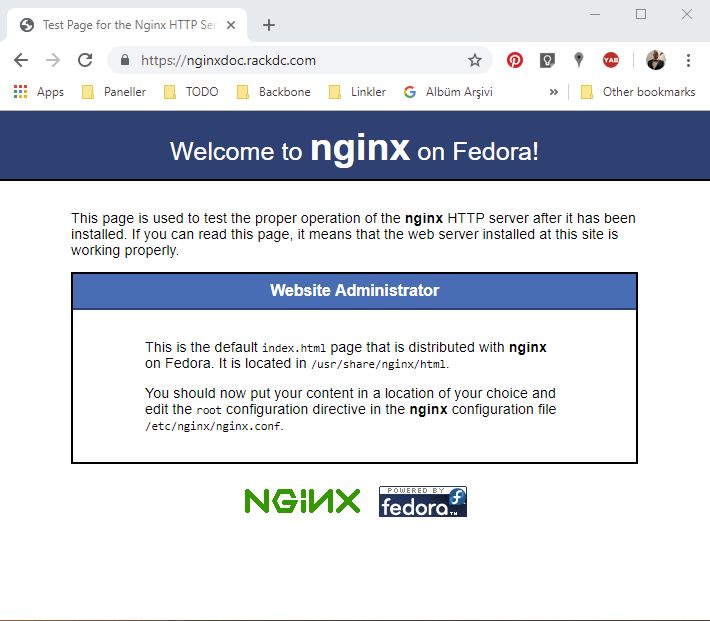
You should see the lock sign on the left hand side of the domain name as shown above. This means your communications are now secured by SSL.
Onlayer Hardening
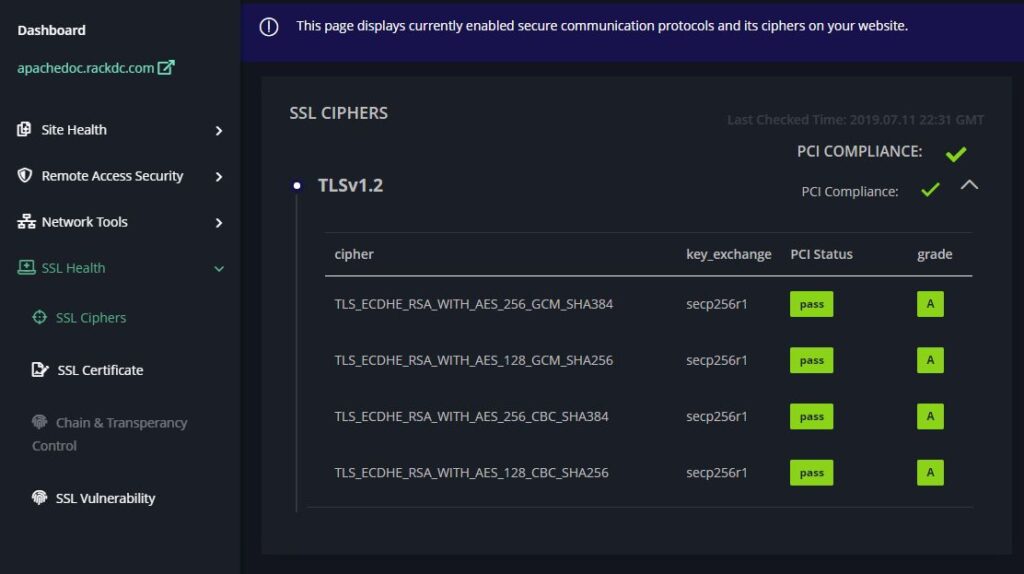
Having an SSL certificate doesn’t automatically make your connection secure. To make your server more secure we recommend adding your service to the Onlayer Dashboard. This way, you can track the changes you make and see what needs to be changed in order to make your service more secure. Once you’ve done so you’ll be presented with a similar page as below.
LEGAL: Copyright (c) 2019 – 2026 ONLAYER Bilişim Teknolojileri A.Ş.
Permission is granted for the redistribution of this alert by explicitly linking the page to be referred. It may not be edited in any way without written consent.
Disclaimer: The information in the advisory is believed to be accurate at the time of publishing based on currently available information. Use of the information constitutes acceptance for use in an AS IS condition. There are no warranties concerning this information. Neither the author nor the publisher accepts any liability for any direct, indirect, or consequential loss or damage arising from the use of, or reliance on, this information.