Preventing Mixed Content
SSL is used to encrypt the connection between the server and the client, nowadays most of the web pages and the images generated on demand. This is made to gain the most of the user experience and to offer customer related experience on a web site. While it is giving us the best experience, every content generated might include user’s valuable information such as id, names and even most secret information.
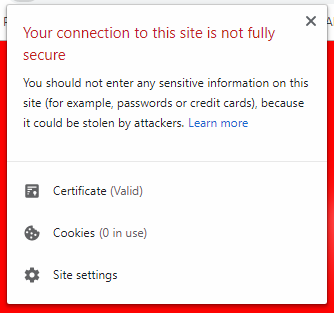
If a secured web page has links to HTTP URL’s like images, javascripts or other includes, you won’t see the lock sign on your browser even the site is protected by a valid SSL certificate as shown below:
If a secured web page includes mixed content, this means that some of the content generated on the server side is delivered to your browser without encryption. An attacker who can listen to network broadcast (being on the same subnet is enough) can reveal this information easily. This may include:
- Auto generated PNG images
- Personal images such as id card, credit card pictures
- Sensitive Documents revealing private information
In order to prevent data leakage, you may:
- Use https:// in all your URL’s
- Periodically scan your site for mixed-content via Onlayer
- Use Content-Security-Policy-Report-Only header to monitor your mixed-content errors
- Use upgrade-insecure-requests header to protect your customers from external or insecure content
Finding Insecure Content
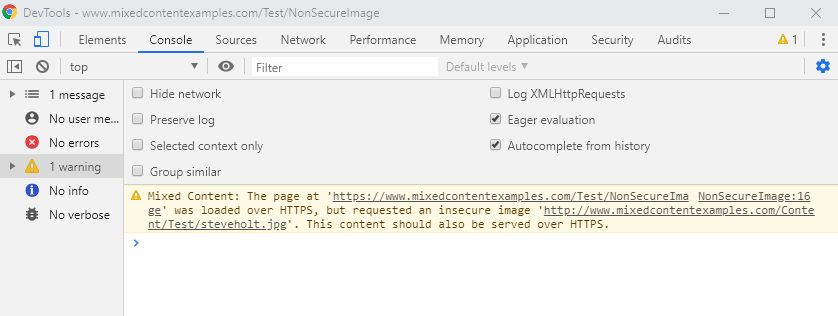
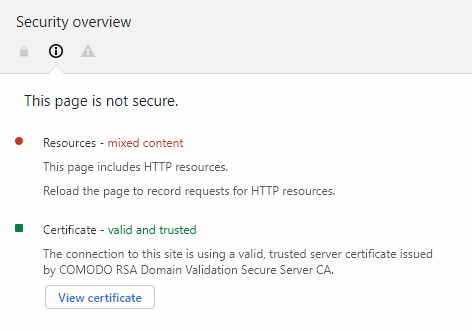
Most of the new generation browsers such as Google Chrome and Firefox include Javascript console, use this console to check your site. To do that simply right click in any place of your website and click inspect. On the Console tab or Security tab you might expect errors or warnings as shown above: